
VendorGuard CA · a Caissonix product · HOA Docs AI included
Track every vendor's insurance and license for every association, without the chasing.
VendorGuard reads your vendors' certificates of insurance, checks them against each association's requirements, re-checks CSLB license, bond and workers' comp every night against CSLB's public data (file date shown), and emails vendors until they're compliant.
- Built for California HOA managers
- Vendors upload with a link, no login
- HOA Docs AI included in every plan
How it works
Set the requirements once. VendorGuard does the follow-up.
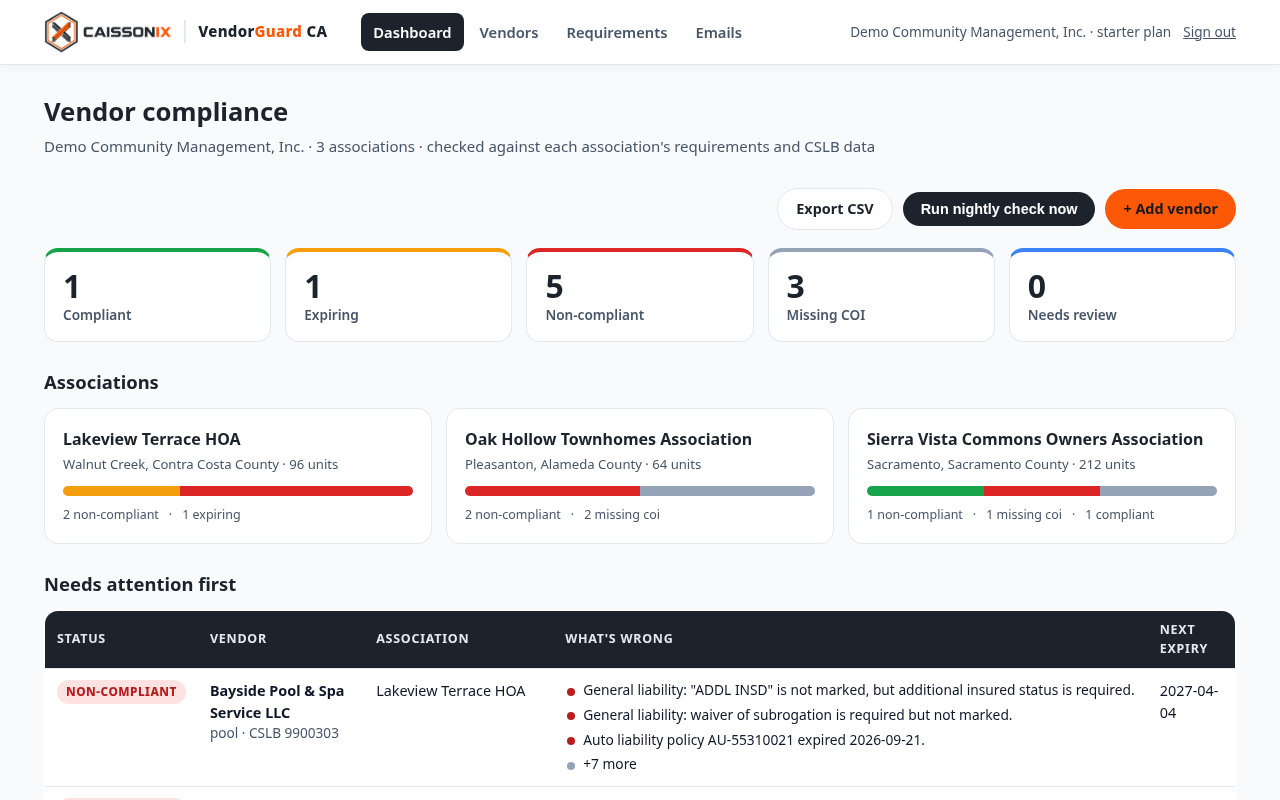
Your team stops opening PDFs and sending "your COI expired" emails. You see who's covered at a glance.
Add associations and vendors
Pick a California HOA requirement template for each association (limits, additional insureds, waiver of subrogation, primary and non-contributory) or set your own.
Vendors upload their COI
Each vendor gets a private upload link they can forward to their insurance agent. VendorGuard reads the ACORD 25 certificate and flags anything that doesn't match.
Watch the dashboard
Compliant, expiring, non-compliant or missing, per association. Reminders go out automatically, and CSLB status is re-checked every night against the latest CSLB data file loaded.
Features
What VendorGuard checks
Certificate reader
Pulls carrier, policy numbers, effective and expiration dates, GL, auto, umbrella and workers' comp limits, the additional insured and waiver boxes, the description wording and the certificate holder.
Requirement matching
Compares every certificate with that association's own requirements and lists each gap in plain English, for example "GL each occurrence is $500,000; requirement is $1,000,000."
Nightly CSLB checks
License status, classification, contractor bond and workers' comp, from the Contractors State License Board's public data (the file date is shown on each license), with a one-click link to the official Instant License Check.
Automatic vendor reminders
Requests, deficiency notices and 30/14/7-day expiry reminders go to the vendor, not your inbox, until the right certificate arrives.
Built for associations
One vendor can serve many associations, each with different requirements and a different certificate holder. VendorGuard tracks each pairing separately.
Board-ready reports
Status by association, a CSV export and a one-page summary for the board packet. Report export: coming in the pilot
Included in every plan
HOA Docs AI: cited answers from the association's own documents
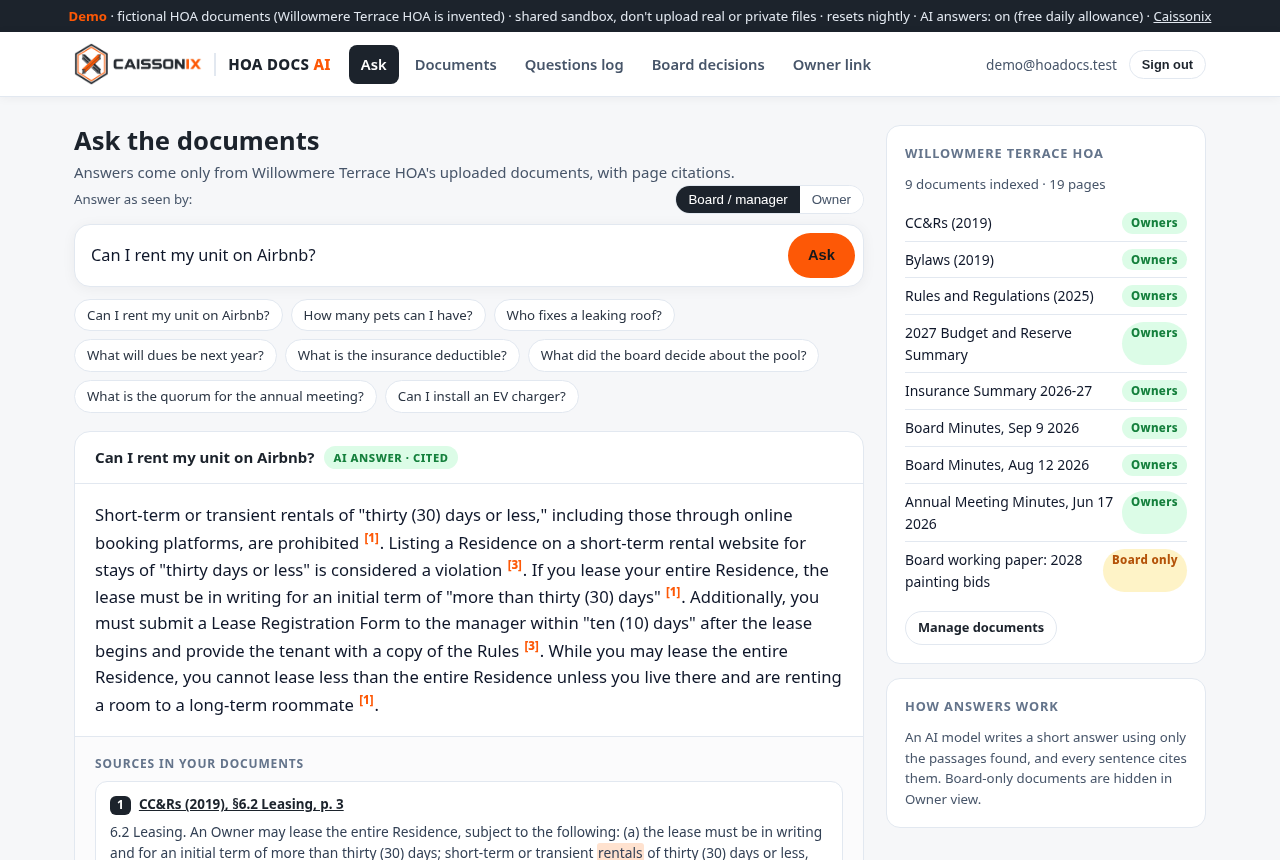
Upload the CC&Rs, bylaws, rules, budget, insurance summary and minutes. Board members, managers and owners ask in plain English and get a short answer with the document, section and page. Try the live demo (fictional association).
Cited answers
Every answer names the document, section and page and opens the PDF there. If the documents don't say, it says so.
Owner Q&A link
One private link per association, no owner logins. Board-only documents never appear in owner answers.
Board decisions and questions log
Every motion in the minutes with the vote and page, and a log of what owners ask most.
Knows when to stop
Legal questions and "will insurance pay my claim?" get a clear notice to talk to an attorney, the manager or the insurer, next to what the documents say.
HOA Docs AI is a document lookup tool, not legal advice. Scanned image-only pages aren't read yet (planned during the pilot).
Why VendorGuard
Generic COI tools don't know California HOAs.
Most certificate trackers were built for construction GCs. California associations need more: CSLB license and workers' comp checks, association-specific additional insured wording, and a separate certificate for every association a vendor serves.
VendorGuard is built by Caissonix, founded by a California property insurance claims professional with nearly 20 years of reading certificates, policies and endorsements. The default requirement templates reflect what California associations commonly put in their vendor agreements, and you can change any of them.
Pricing
One price per portfolio. Both products included.
Every plan includes VendorGuard CA and HOA Docs AI with unlimited vendors, certificates and board questions. Monthly, cancel anytime. Pay yearly and get two months free.
Self-managed HOA
For a board running its own association
- 1 association
- VendorGuard: certificate reading, requirement matching, nightly CSLB checks, vendor reminders
- HOA Docs AI with the owner Q&A link
Starter
Up to 10 associations (about $30 each)
- Everything in Self-managed, for every association
- Per-association requirements and certificate holders
- One login across your portfolio
- CSV export of vendor status
Growth
Up to 30 associations (about $23 each)
- Everything in Starter
- Priority support
Portfolio
31 associations or more
- Everything in Growth
- Onboarding help loading vendors and documents
Founding pilot: the first five California management companies or self-managed boards get 60 days free and help shape the product. Add-on: an HOA Coverage Review of the master policy, quoted per association.
FAQ
Common questions
Is this insurance or legal advice?
No. VendorGuard is a document-tracking tool. It compares certificates and public license data with the requirements your association or company sets. It doesn't recommend coverage, limits or carriers, and it doesn't sell or place insurance. Talk to your insurance broker or attorney about what your requirements should be.
Do vendors need an account?
No. Each vendor gets a private upload link. Most vendors forward it to their insurance agent, who uploads the certificate directly.
Where does the license information come from?
From the Contractors State License Board's free public data files. VendorGuard re-checks every tracked license each night against the most recent CSLB file it has loaded, and shows that file's date. CSLB data is current only as of its file date, so every license shows a link to CSLB's official Instant License Check.
What if the certificate is read wrong?
Anything VendorGuard can't read with confidence is marked "needs review" for a person to confirm. You can always open the original PDF, and vendors can reply to any reminder to have a person take a look.
Does a certificate prove a vendor is covered?
No. A certificate is information only and doesn't change the policy. VendorGuard helps you collect and track the documents your agreements require; it can't guarantee coverage is in force. Ask for endorsements where your agreements require them.
Does it work with AppFolio, Vantaca or other software?
Not directly yet. Today you can export status as CSV; spreadsheet import is coming during the pilot. Integrations are on the roadmap. Tell us what you use.
How is our data protected?
Each company's data is kept separate, certificates are stored privately and opened only through short-lived links, and VendorGuard never asks for Social Security numbers or bank details.
Get started
Join the founding pilot
Tell us a little about your portfolio. We'll reply within 1 business day.
What happens next
Please don't send certificates or vendor lists by email yet. You'll get a secure way to upload them.
Questions first? Email
Thanks. You're on the list.
We'll reply within 1 business day with a short demo and next steps.